E-book · PDF + EPUB · 342 pages
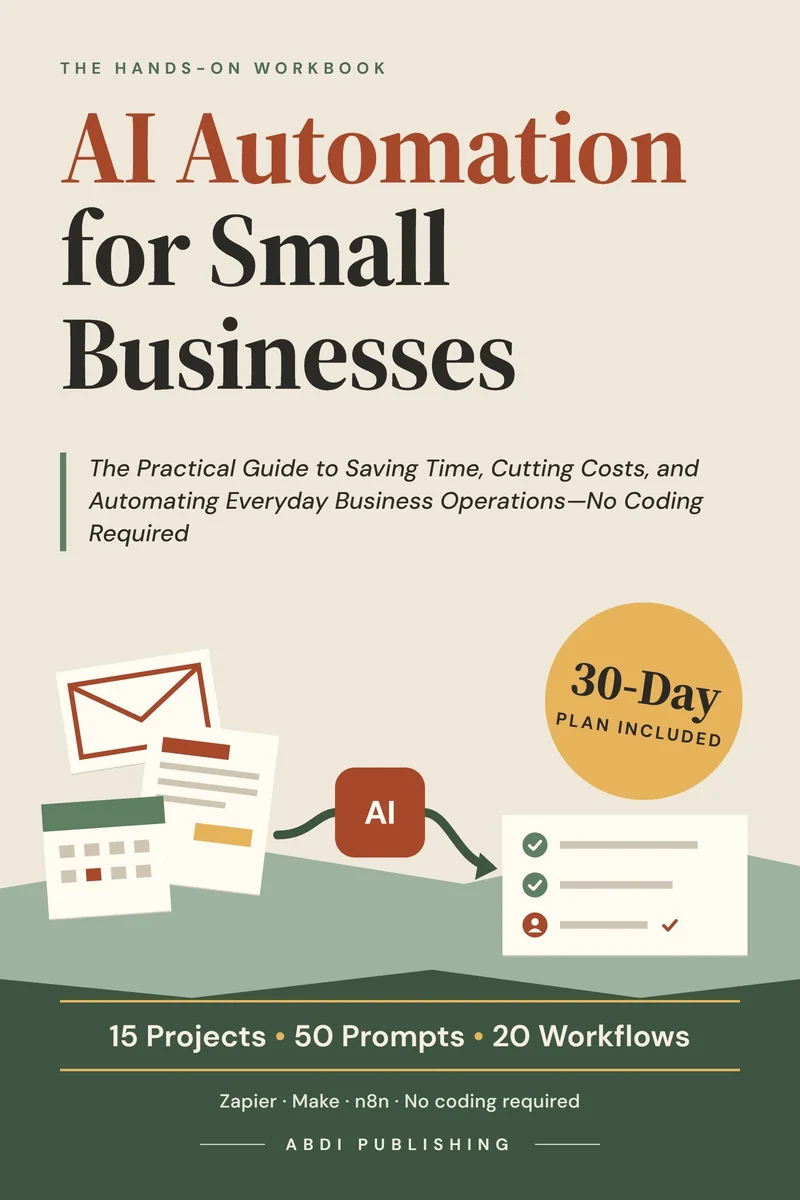
AI Automation for Small Businesses
The Practical Guide to Saving Time, Cutting Costs, and Automating Everyday Business Operations—No Coding Required
By ABDI Publishing · First edition, 2026 · American English
The e-book is not on sale yet. It will be one purchase: PDF and EPUB, plus the editable companion files and the Troubleshooting Prompt Library. Questions? Contact us.
What you get
One purchase, every format
- PDF: the print-faithful edition, with the companion files also attached inside the PDF.
- EPUB: reflowable text for e-readers and phones.
- Companion files: Worksheets.xlsx, ROI_Calculator.xlsx, Prompt_Templates.md, Workflow_Templates (.md and .csv), Invoice_Test_Set.csv and AI_Automation_Policy_Template.docx (Appendix K).
- Troubleshooting Prompt Library: 45 prompts, three for each project (guided setup, troubleshooting and verification), as an 18-page PDF and a Markdown file you can copy from.
- Download links by email, valid for 72 hours, and re-sendable whenever you need them.
What you'll need
- A computer with a web browser, a business email account (Gmail or Microsoft 365), Google Sheets or Excel, and an account on one automation platform.
- Free plans are enough for the first tutorial and for learning. Most AI tutorials need a paid plan.
- Zapier's Professional plan was listed from $19.99 a month, billed annually, for its smallest task tier on November 21, 2026 (monthly billing and larger task tiers cost more). On the same date, Make's Free plan included 1,000 credits a month.
- AI usage is paid per run or per amount of text processed. Always set a spending limit, and check each vendor's pricing page on the day you decide.
Sample pages
Read a few pages first
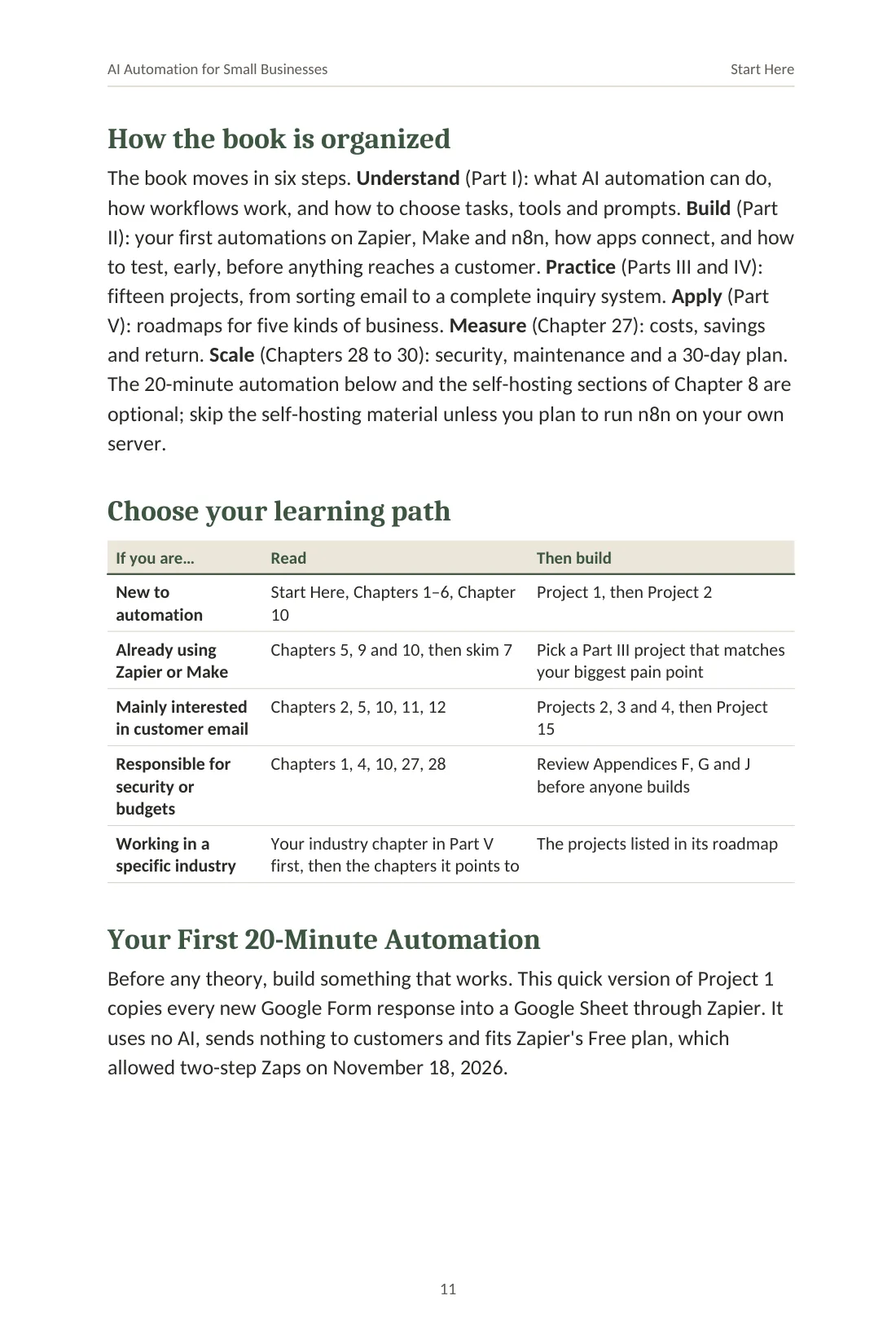
A clear path from day one
The book moves in six steps, from understanding to scaling. A learning-path table tells you exactly which chapters to read and which project to build first, whether you are new to automation or already use Zapier or Make.
Page 11
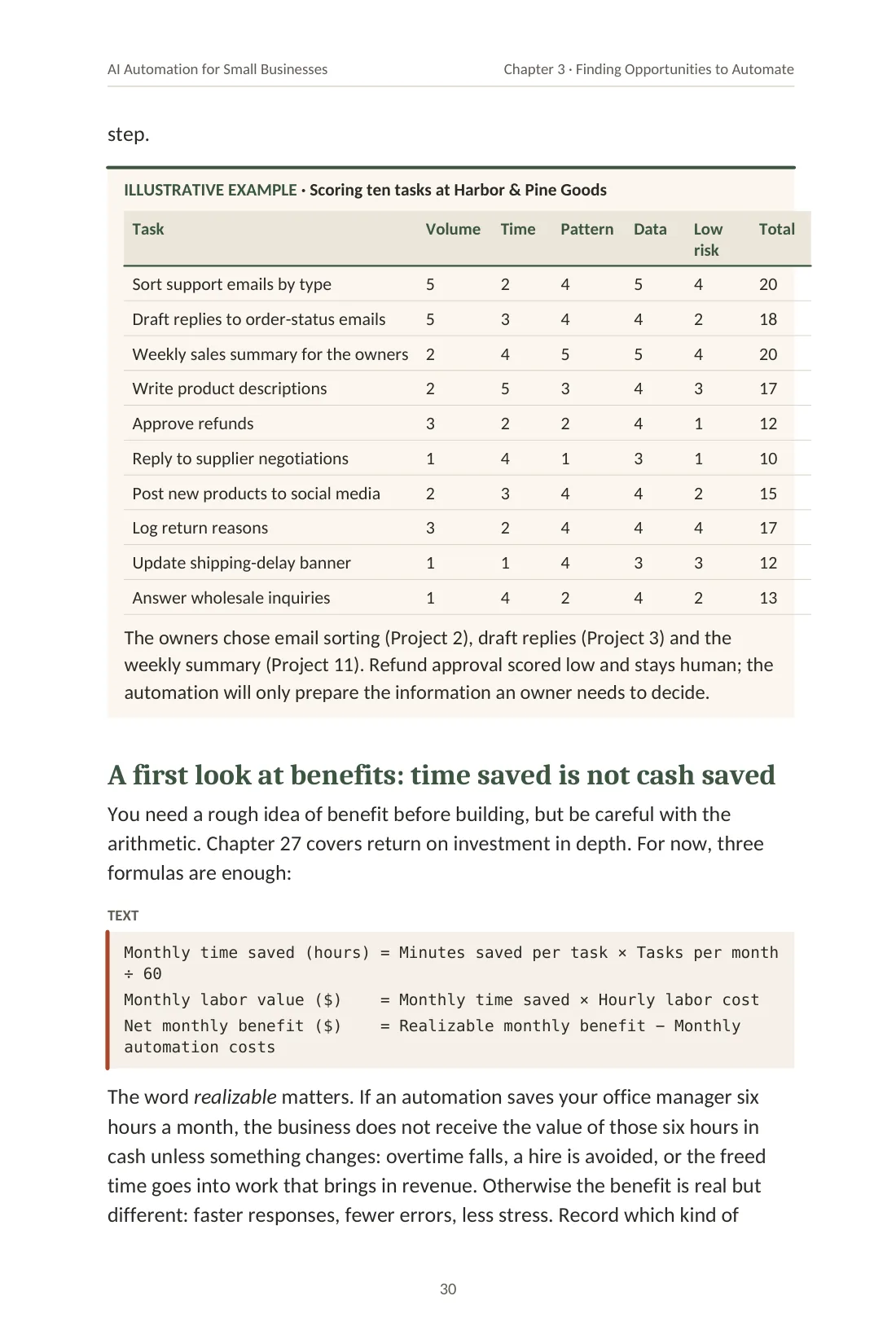
Know what to automate first
Stop guessing where to start. A simple scoring table ranks your recurring tasks, so you build the ones worth automating first and keep risky decisions, like refund approvals, with a person.
Page 30
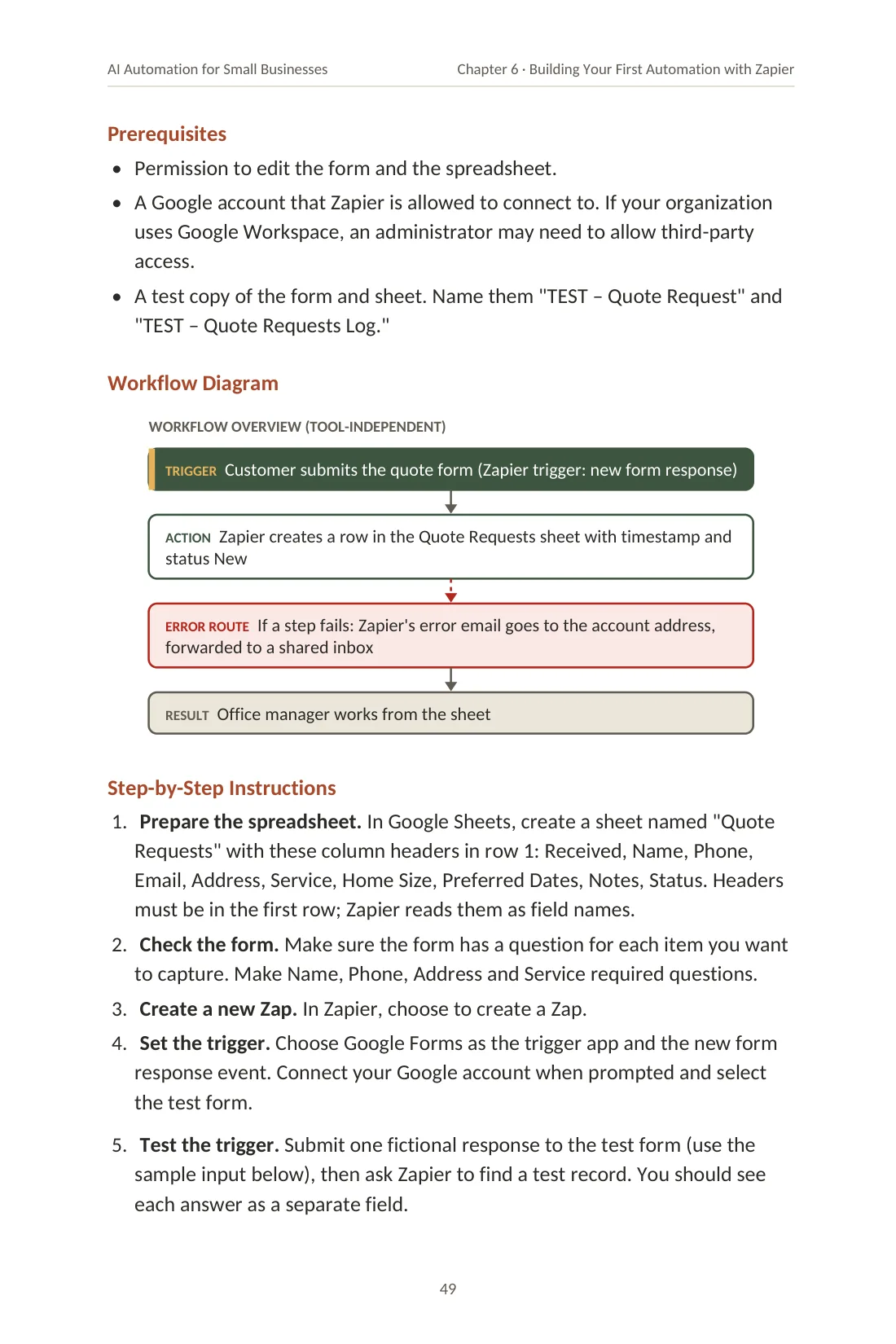
Your first workflow, step by step
Every project starts with what you need, a one-glance workflow diagram and numbered steps. Here, form submissions land in an organized spreadsheet automatically, with no code.
Page 49
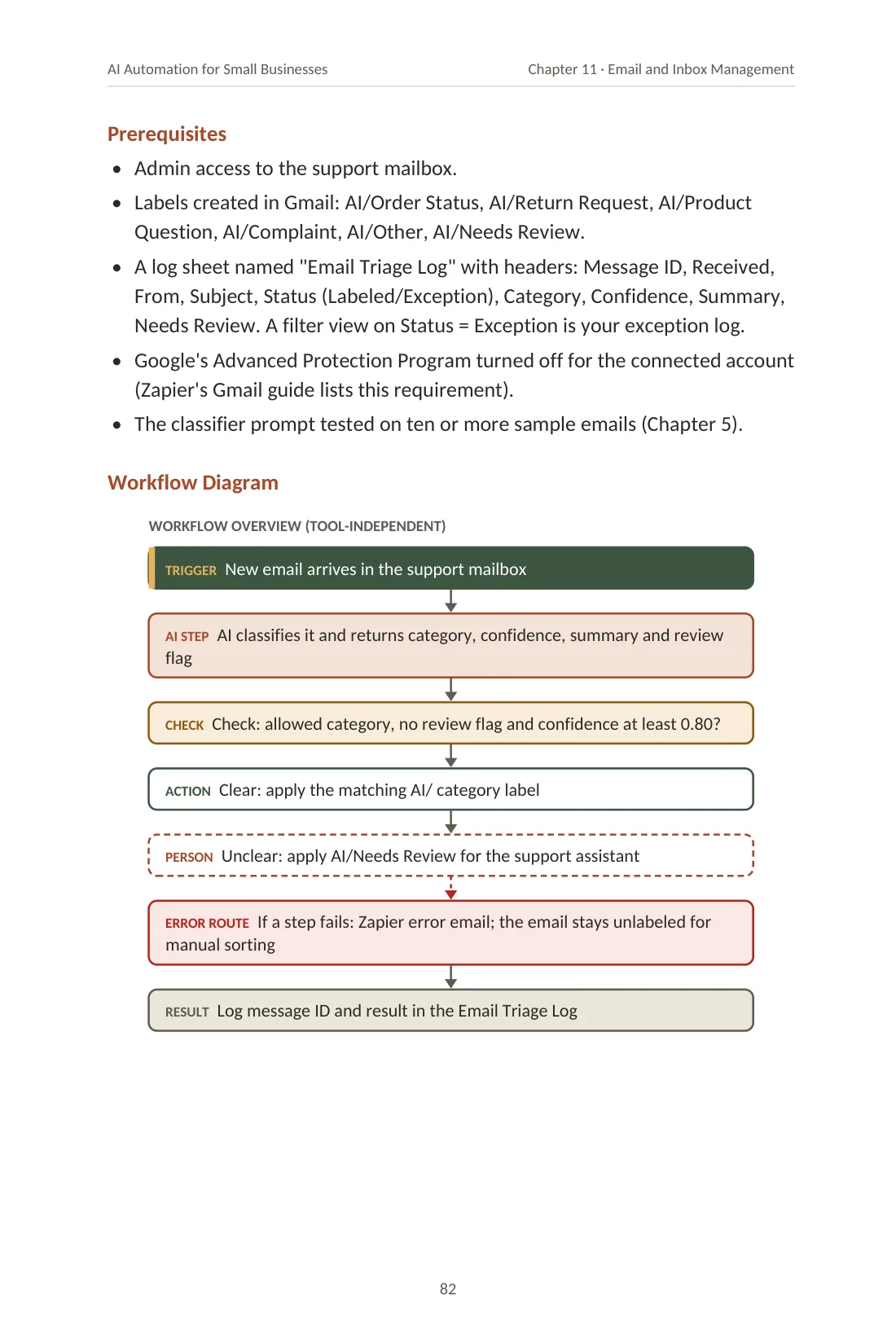
Let AI sort your inbox, safely
Build a workflow that labels incoming support email by type. Anything unclear or low-confidence goes to a person for review instead of being guessed.
Page 82
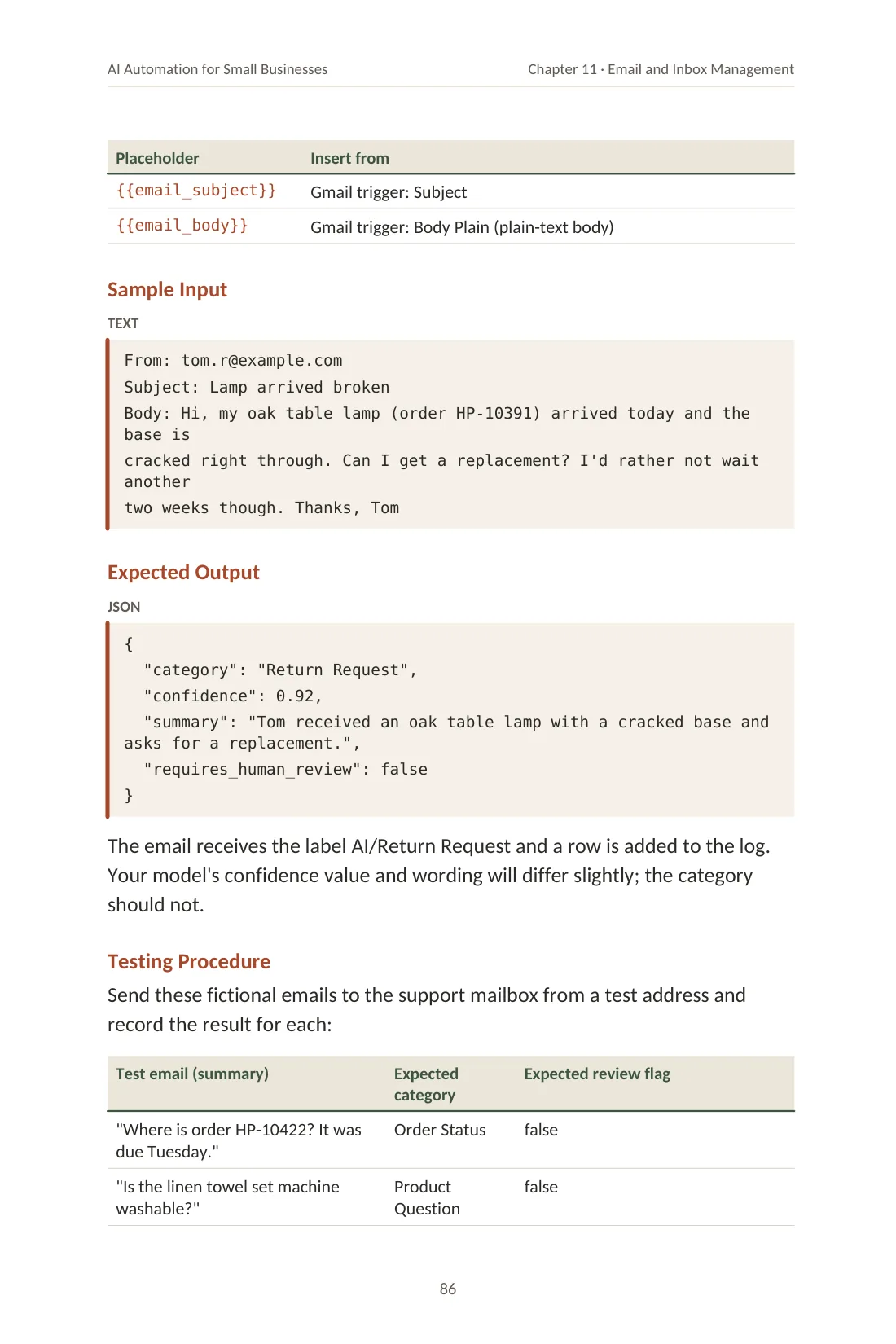
See what good output looks like
The AI steps come with a sample input and the output you should expect, followed by a testing table with fictional emails, so you can check your own results before going live.
Page 86
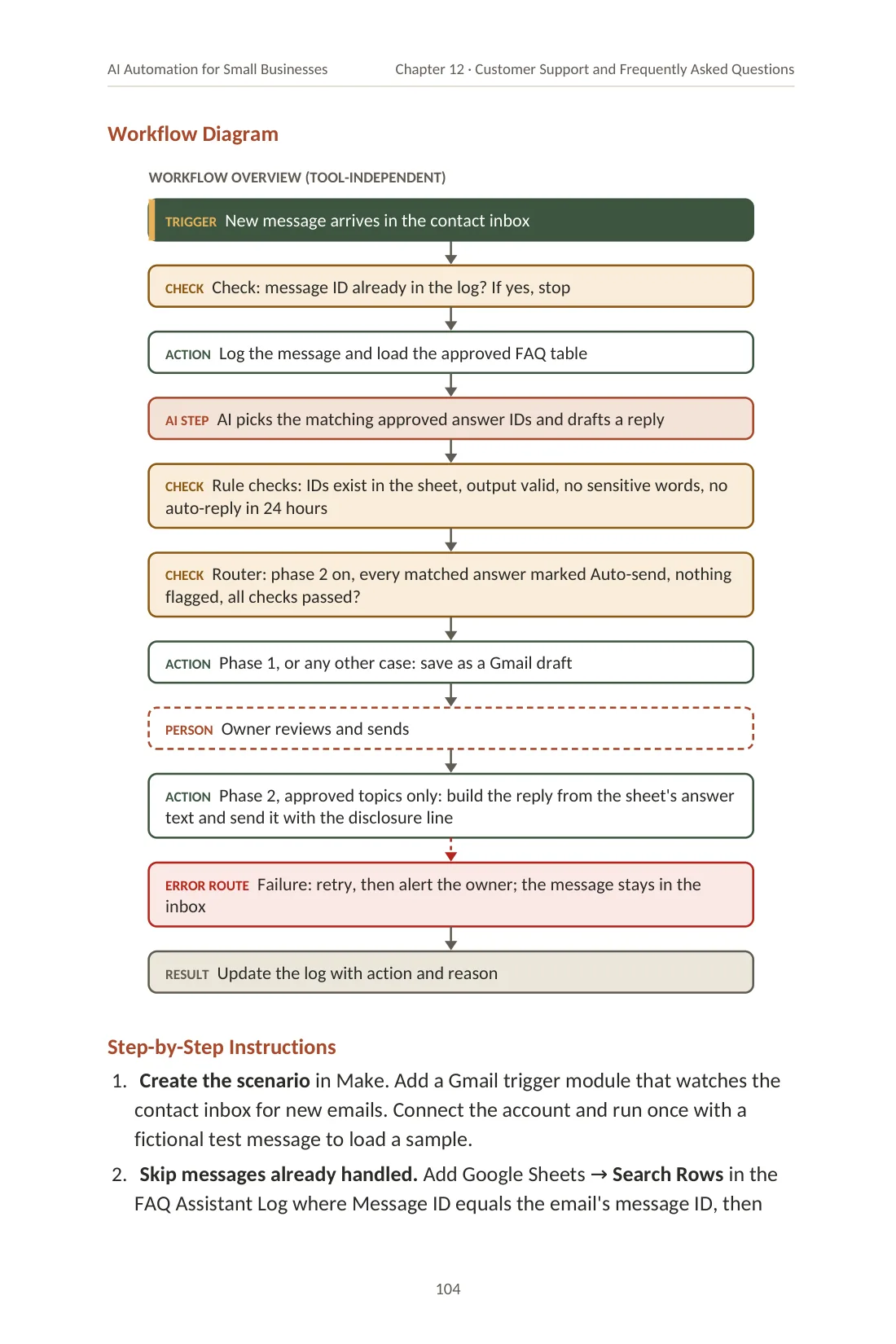
Workflows you can build for your business
Ready-to-follow workflows like this FAQ assistant answer customers from your own approved answers. It starts by saving drafts for you to review, and only sends on its own for topics you approve.
Page 104
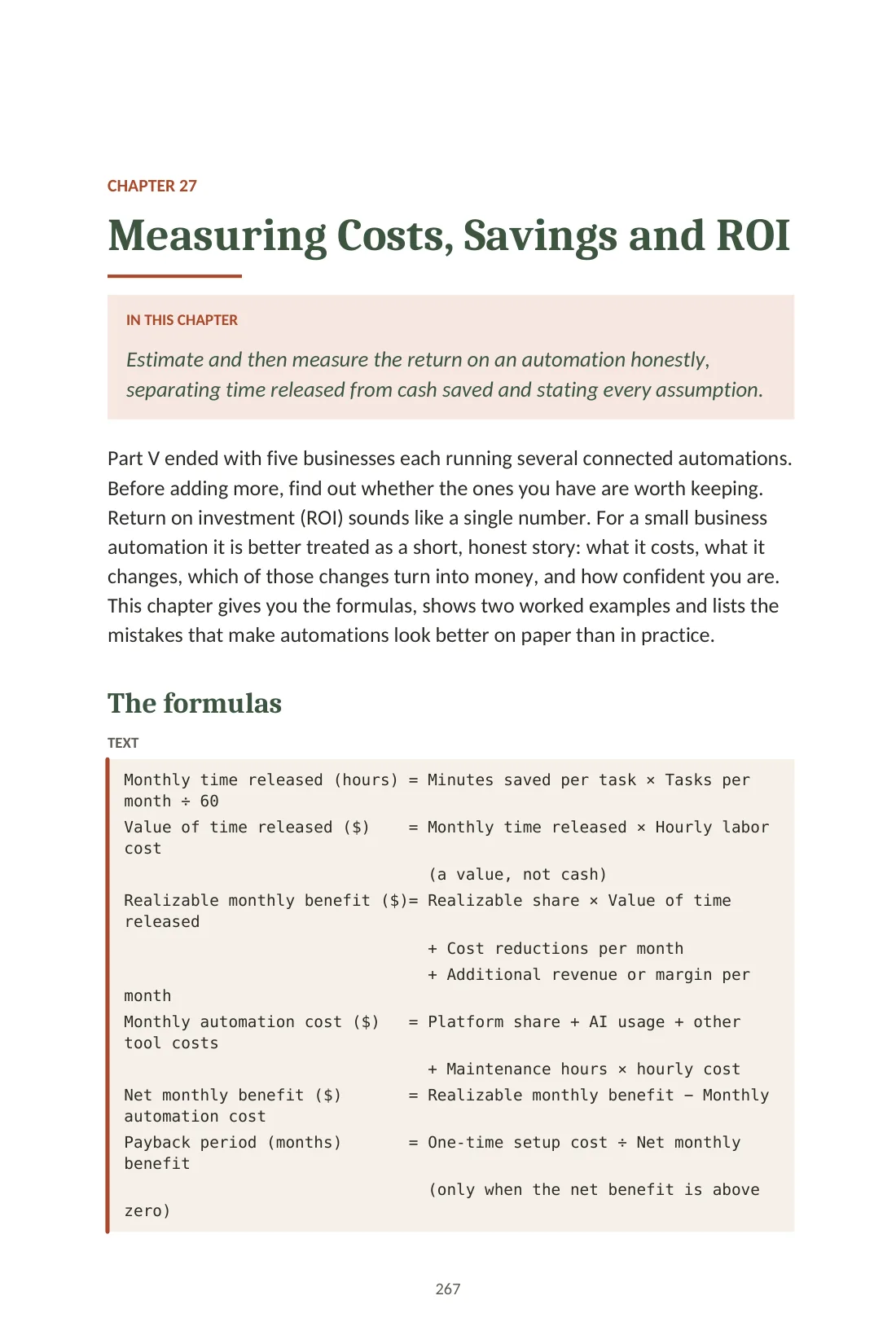
Find out if it pays off
Simple formulas show what an automation costs and what it gives back. Time released and cash saved are kept apart, so you see a real return, not a flattering one.
Page 267
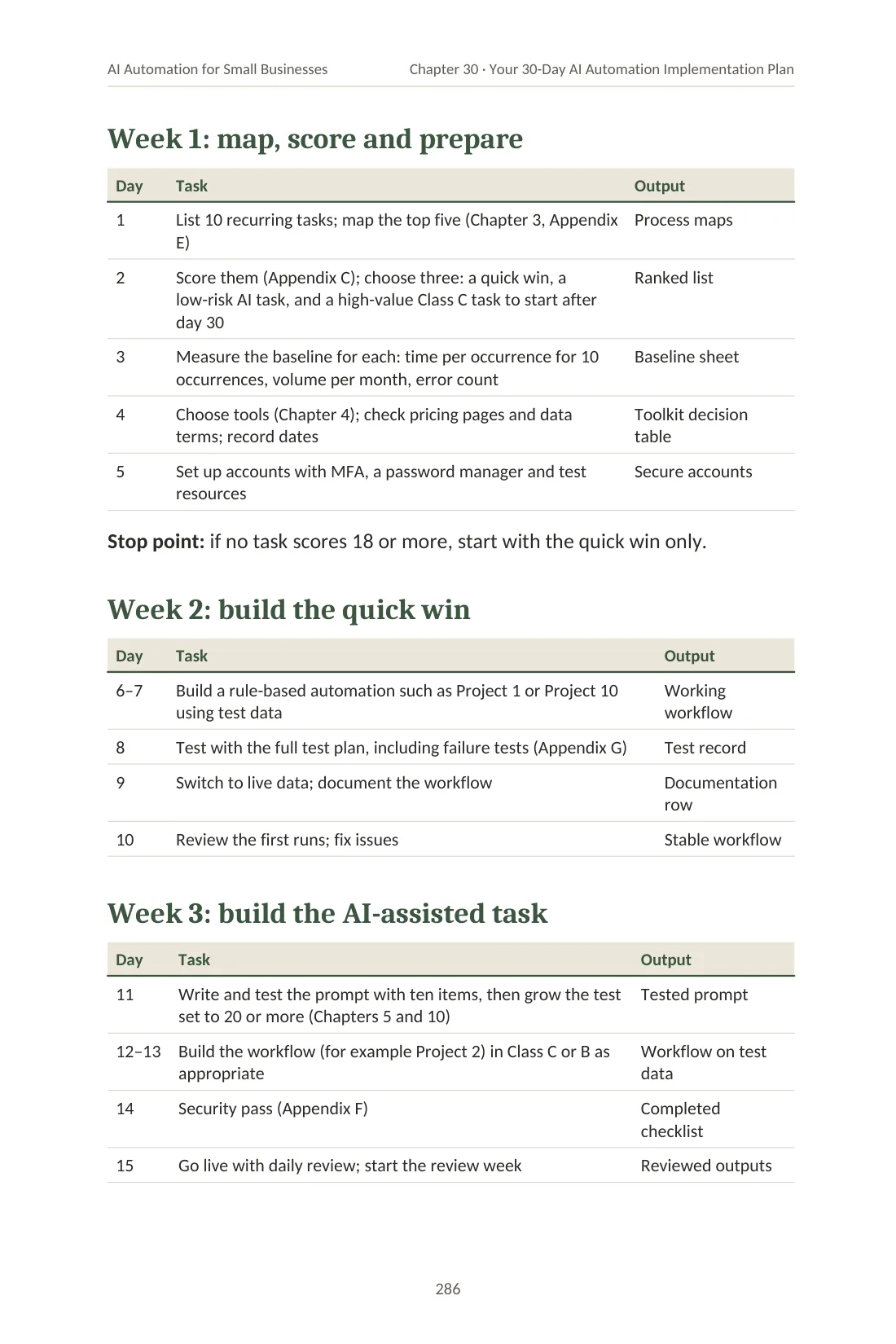
A 30-day plan, day by day
Not sure how to fit this into a busy month? The 30-day plan gives you one task and one output per day, from listing your tasks to running your first automation on live data.
Page 286
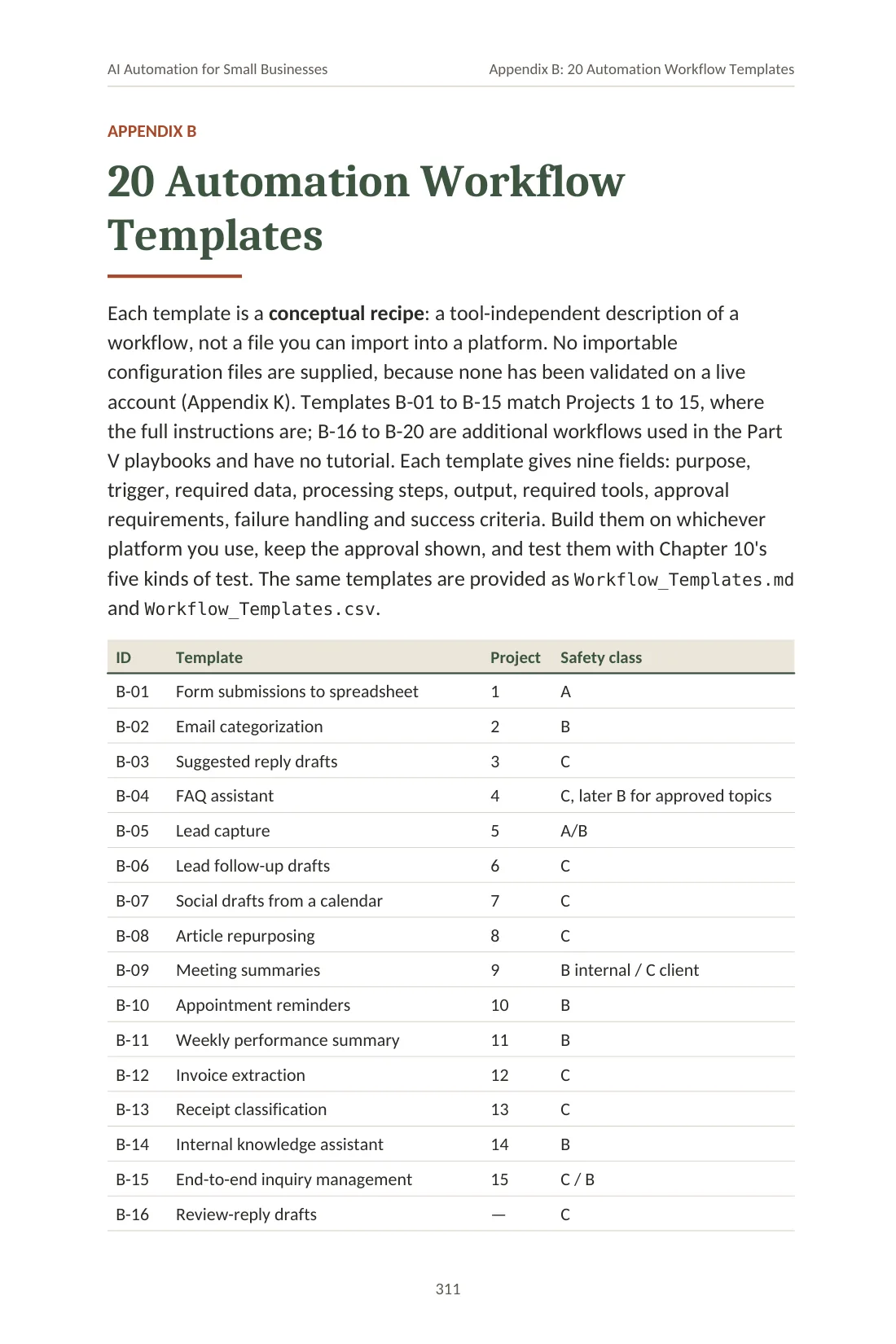
20 workflow templates to reuse
Twenty tool-independent recipes give the trigger, data, steps, approvals, failure handling and success criteria for each workflow. Build them on Zapier, Make or n8n.
Page 311
Included: Troubleshooting Prompt Library
Stuck mid-build? There's a prompt for that.
Three ready-to-paste prompts for each of the 15 projects. Paste one into an AI assistant, fill in the brackets, and let it coach you through the part of the build you are stuck on.
45 prompts · three for each of the 15 projects · PDF and Markdown
- Guided setup: the assistant walks you through a project one step at a time and tells you what you should see when each step worked.
- Troubleshooting: describe what you expected and what happened. The assistant checks the trigger, each step's output, the mapping and plan limits in order, then gives at most three likely causes, each with a two-minute check.
- Verification: the assistant writes a set of fictional test cases with expected results and says "Verified in my account" only when every must-pass case passed in your own run.
- Built-in safety: fictional or redacted data only, never passwords or API keys, and the assistant is told to say when it isn't sure instead of guessing.
Table of contents
30 chapters in six parts
A free sample is being prepared. Until then, here is the complete table of contents.
Part IUnderstanding AI Automation
- What AI Can and Cannot Do for Small Businesses
- How Business Automation Works
- Finding Opportunities to Automate
- Choosing the Right Tools
- Writing Effective AI Prompts
Part IIBuilding Your First Automations
- Building Your First Automation with Zapier
- Understanding Make and Visual Workflows
- Working with n8n
- Connecting Business Applications
- Testing and Troubleshooting Your Automations
Part IIIAutomating Everyday Business Tasks
- Email and Inbox Management
- Customer Support and Frequently Asked Questions
- Sales Leads and Follow-Ups
- Marketing and Social Media
- Scheduling and Administrative Tasks
- Documents and Data Entry
- Invoices, Expenses and Bookkeeping
- Hiring and Employee Onboarding
Part IVCreating Complete AI Workflows
- Building an Internal AI Knowledge Assistant
- Connecting Multiple Automations
- Building an End-to-End Customer Inquiry System
Part VIndustry-Specific Automation Playbooks
- AI Automation for Restaurants and Cafés
- AI Automation for E-commerce
- AI Automation for Consultants and Agencies
- AI Automation for Real Estate
- AI Automation for Local Service Businesses
Part VIMeasuring and Scaling Automation
- Measuring Costs, Savings and ROI
- Security, Privacy and Responsible AI
- Maintaining Reliable Workflows
- Your 30-Day AI Automation Implementation Plan
AppendicesReference
- Appendix A: 50 Ready-to-Use Business AI Prompts
- Appendix B: 20 Automation Workflow Templates
- Appendix C: Automation Opportunity Assessment Worksheet
- Appendix D: Automation ROI Calculator
- Appendix E: Business Process Mapping Worksheet
- Appendix F: Security and Privacy Checklist
- Appendix G: Automation Testing Checklist
- Appendix H: Troubleshooting Reference
- Appendix I: AI Automation Glossary
- Appendix J: Business AI Automation Policy Template
- Appendix K: Companion Materials and Manual Testing Register
Is it right for you?
A good fit if
- You are a small business owner, manager, freelancer or member of office staff.
- You already use email, spreadsheets, online forms and a few business apps.
- You do not know how to program, and you do not want to learn.
- You can set aside four to six hours a week in your first month to build and test.
- You want a person to stay in control of anything that reaches customers or involves money.
Look elsewhere for
- Developers looking for code-level API integrations. The book uses no-code platforms: Zapier, Make and n8n.
- Ready-made workflows that were run end to end and can be switched on without testing. No tutorial in this edition was run on a live account. You test each one as you build it.
- Legal, tax or compliance advice. The book provides general information only (see its Disclaimer).
Straight answers
What this book does and doesn't claim
- No tutorial in this edition has been live-executed. All 15 projects were checked against official vendor documentation and reviewed for missing steps and safety gaps. Treat each one as a carefully checked blueprint and run its tests before you rely on it.
- Software features, plans and prices were checked against official documentation between November 18 and 21, 2026, and may have changed since.
- All businesses, people and data in the examples are fictional.
- ABDI Publishing is not affiliated with, sponsored by or endorsed by any vendor named in the book.
- The book promises no particular savings. Chapter 27 shows you how to measure costs, savings and return for your own business.
- It was produced with the assistance of AI tools and reviewed by the publisher.
Questions
Before you buy
What exactly do I get?
One purchase gives you the complete book as both a PDF and an EPUB, plus the editable companion files: worksheets, an ROI calculator, prompt and workflow templates, an invoice test set and a policy template. There are no separate format purchases.
How is the book delivered?
Right after payment you get a download page, and we email the same link to the address you used at checkout. Each link works for 72 hours and up to 10 downloads. If it expires, request a fresh one from the resend page at any time.
Do I need to know how to code?
No. The book is written for people who use email, spreadsheets, online forms and a few business apps. It uses no-code platforms: Zapier, Make and n8n.
Which tools do I need, and what do they cost?
A computer with a web browser, a business email account, Google Sheets or Excel, and an account on one automation platform. Free plans are enough for the first tutorial. Most AI tutorials need a paid plan, and AI usage is paid per run; for the volumes in the book's examples this is usually a small monthly amount. Prices change often: the book gives the prices it found in November 2026 and asks you to check each vendor's pricing page on the day you decide.
Have the workflows been tested?
Each tutorial was checked against the platform's official documentation and reviewed for missing steps and safety gaps, and some were simulated in a short script. None was run end to end on a live account. Every project includes its own testing procedure, so you test it as you build it, before it reaches a customer.
Will this save my business money?
No book can promise that. This one shows you how to pick tasks that are worth automating, and Chapter 27 shows you how to measure costs, savings and return honestly for your own business.
Which devices can I read it on?
The PDF works in any PDF reader on a computer, tablet or phone. The EPUB works in e-reader apps such as Apple Books, Google Play Books, Kobo and Calibre. To read on a Kindle, use Amazon's Send to Kindle, which accepts EPUB files. Appendix K explains how to open each companion file.
What is your refund policy?
If the book isn't right for you, email us within the refund window in our refund policy for a full refund. Your download links stop working once the refund is processed.
I bought it but can't find the email.
Check your spam or promotions folder first. Then use the resend page with the email address you used at checkout, and we'll send a new link.
Get the complete guide
The e-book is not on sale yet. It will be one purchase: PDF and EPUB, plus the editable companion files and the Troubleshooting Prompt Library. Questions? Contact us.